Viloud to a TV App: Apple TV, Roku & Fire TV
How to put a Viloud channel on Apple TV, Roku and Fire TV in 2026: the 24/7 stream and the videos behind it, connected with one channel ID, no API key and no re-uploading.
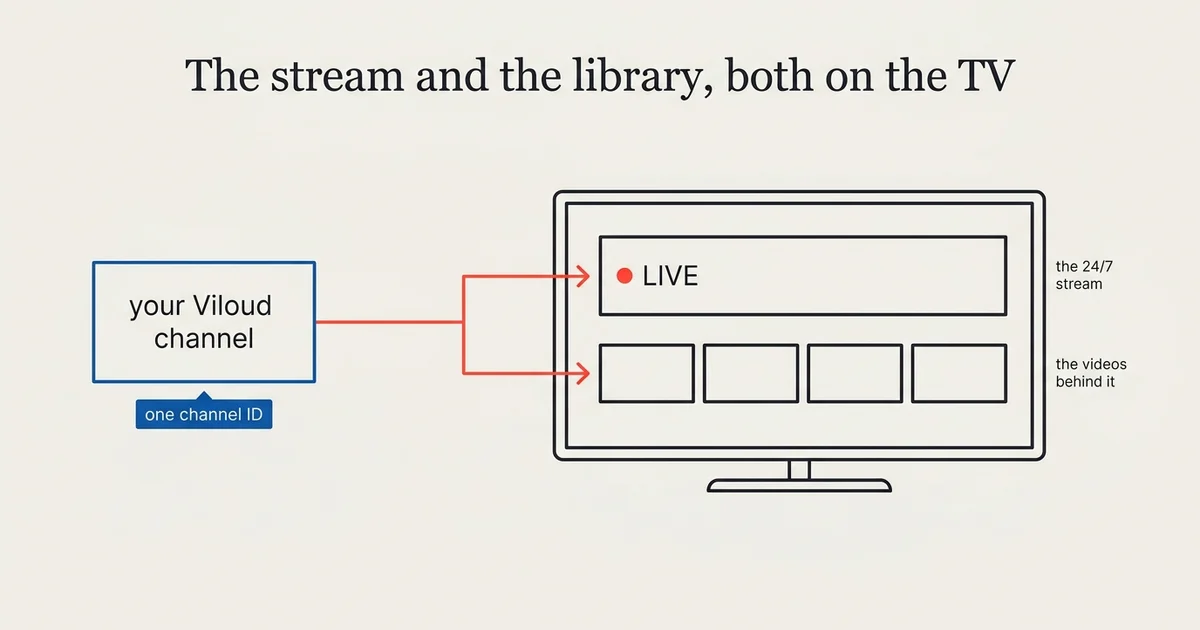
Viloud is a channel builder, not a TV platform. It takes a library of videos, schedules them into a 24/7 linear stream, and hands you an M3U8 you can embed anywhere. It does not put that channel on a living-room screen. A Tappla app does.
As of September 2026, Tappla connects a Viloud channel to native apps on all three major living-room platforms, Apple TV, Roku and Fire TV, using one channel ID and no API key. It brings across both halves of the channel: the broadcast, and the videos the broadcast is made of. Most routes from Viloud to a television keep only the first.
If you run a FAST channel, a community or diaspora network, or a local station that broadcasts around the clock, this is how that channel reaches the television.
What Viloud does
Viloud assembles videos into channels. You upload or link your videos, arrange them on a schedule, and Viloud streams the result as a continuous broadcast: the same programme at the same time for everyone watching, the way a television channel has always worked.
That format has a name, FAST, for free ad-supported streaming television, and it is the reason Viloud exists. What Viloud gives you is a real 24/7 channel without a playout facility. What it does not give you is a presence on Apple TV, Roku or Fire TV.
Why a Viloud channel doesn’t just appear on a TV
A living-room device does not browse the web the way a phone does. Apple TV, Roku and Fire TV each need a native app, built for that platform, that knows where your stream is and how to play it.
Viloud hands you exactly what such an app needs: an HLS stream. The missing piece is the app itself, the branded installable software your viewers find in the store, open with a remote, and come back to.
The half most Viloud-to-TV routes drop
Take the M3U8 from Viloud, paste it into a TV app builder as a video, and you get one tile: whatever happens to be on air right now.
That works. It is also a fraction of what you have.
A Viloud channel is two things at once. It is a 24/7 broadcast, and it is the library of videos that broadcast is assembled from, each one carrying a title, a description, a duration and a thumbnail that Viloud already holds. A channel with a week of programming can have sixty individual pieces behind it. Pasting the stream URL throws all sixty away and keeps the tile.
Tappla reads both halves.
How Tappla connects Viloud to a TV app
The 24/7 stream becomes your Live row
Your channel keeps broadcasting, and it takes the top row of your app. On Roku and Fire TV it gets the live presenter, the treatment those platforms reserve for something that is on air rather than on demand. A viewer who opens your app and wants whatever is playing is one click from it.
The videos behind it become a browsable playlist
Every video scheduled on the channel also appears as its own item, with the title, description, duration and thumbnail Viloud already has. A viewer who does not want to join halfway through an episode picks it and watches from the start.
Neither replaces the other. Linear for people who want to lean back, on demand for everyone who missed it.
More than one channel
If you run several Viloud channels, each becomes its own playlist in the same app. One app, your whole network.
It stays in sync
Tappla re-checks your channels on a schedule. Change the programming in Viloud and the app follows, with no re-submission and no re-upload. There is a manual re-sync in the dashboard when you want it immediately.
What you connect: one channel ID
Open your channel in Viloud and copy the 32-character code from its address. That is the whole setup. If it is easier, paste the stream URL you already have, app.viloud.tv/hls/channel/ID.m3u8, and we take the ID out of it.
There is no API key
Most integrations want credentials. This one does not. Viloud serves channel data openly, so there is nothing to generate, store, rotate or lose. It is the shortest connection of any source we support.
What that openness also means
Worth knowing before you choose a host rather than after. Because the data is served without a key, anyone holding your channel ID, and it is visible in the stream URL wherever you embed it, can read your channel’s contents.
For most FAST channels that is irrelevant, because the whole point is being freely watchable. If your library is not meant to be freely reachable, that is a question for Viloud about your plan, and a reason to look at a host with per-video access control instead.
Viloud on Apple TV, Roku and Fire TV
Apple TV
A native tvOS app, built and signed for you and uploaded to your own App Store Connect account. Apple charges $99 a year for the developer account. The listing is yours.
Roku
A native SDK channel, not a Direct Publisher feed, packaged for your own Roku developer account. Roku’s account is free.
Fire TV
A native Fire OS app, delivered as a signed APK ready to publish to the Amazon Appstore under your own free developer account.
One Viloud connection powers all three. You do the final submit each time, which is what keeps the listing in your name.
Viloud compared with other video sources
| Source | What it is | What Tappla pulls |
|---|---|---|
| Viloud | Channel builder, 24/7 linear | The live stream and every video on the channel |
| Vimeo | Video hosting | Showcases and folders as playlists (Standard plan or higher) |
| Bunny Stream | Video hosting on a CDN | The whole library, collections as playlists |
| Boxcast, Resi, StreamSpot | Live streaming | The live stream |
| JSON feed / HLS URL | Your own setup | Whatever the feed declares |
Viloud is the only one of these that is linear by design, which is why it is the only one where the answer involves two rows instead of one.
What this is not
Tappla builds the app, not the hosting
Your videos stay on Viloud, billed by Viloud. We read the channel and build the apps around it. No migration, no re-encoding, no bandwidth bill from us.
Tappla does not insert ads
The first A in FAST is advertising, and Viloud supports ad insertion in its own web player. That player is not what a TV app uses, because a native app plays the stream directly. If advertising is central to your channel, plan it on the streaming side rather than expecting the app to carry it.
A TV app can’t play straight from YouTube
If your channel’s source material lives on YouTube, that is a separate problem. Apple TV, Roku and Fire TV do not allow apps to play YouTube videos, and YouTube’s terms forbid storing the files elsewhere. The videos need a host that hands out a real stream, which is the longer answer here.
Who this is for
FAST channel operators who have built the channel and now want it where people actually watch television. Community and diaspora networks broadcasting to an audience spread across a country. Local stations running a round-the-clock schedule. Anyone whose video already runs as a channel and whose viewers keep asking whether there is an app. For the bigger picture, own apps next to FAST aggregators, see how to put your FAST channel on your own TV apps.
Step-by-step: from a Viloud channel to a TV app
- Copy your channel ID from Viloud, the 32-character code in the channel’s address.
- Connect it in your Tappla dashboard under Video Source, one ID per line if you have several.
- Check the result. Your channel’s videos appear as a playlist and the 24/7 stream is set up as your Live row.
- Brand the app with your logo, colours and layout in the dashboard.
- Preview it in the browser, as the real app, before anything is submitted.
- We build and sign the apps for the platforms you chose and hand over the store assets.
- You submit under your own developer accounts.
From connecting a channel to a branded, installable app is usually a matter of days.
What it costs
Your Viloud plan stays with Viloud, billed directly. Tappla is separate: a single native app (Roku, Fire TV or Android TV) is $49/month, all three native platforms together are $149/month, and the managed video feed on its own is $24/month. Full details are on the pricing page.
Summing it up
A Viloud channel on a TV does not have to mean a single tile showing whatever is on air. Connect the channel and you get the broadcast and the programme behind it: the live row for people who want to lean back, the catalogue for everyone who missed it.
Start on the Fire TV app builder for the fastest path, or see how the same connection powers Apple TV and Roku. Weighing hosts before you commit? The video hosting comparison puts Viloud next to Vimeo, Bunny and the live providers.
Frequently asked questions
Can I turn my Viloud channel into an Apple TV, Roku or Fire TV app?
Yes. Tappla connects your Viloud channel and generates a native app for each platform. Your 24/7 stream becomes the app’s live row and the videos scheduled on the channel become a browsable playlist, both kept in sync automatically.
Do I need a Viloud API key?
No. Viloud serves channel data without a key, so the only thing you provide is your channel ID, the 32-character code in the channel’s address. Pasting the stream URL works too.
Will my app only show whatever is on air?
No, and that is the main reason to connect Viloud properly rather than pasting the stream URL as a single video. Pasting the URL gives you one tile. Connecting the channel gives you the live row plus every video on it, each with its own title, description, duration and thumbnail.
Can I put several Viloud channels in one app?
Yes. Each channel becomes its own playlist in the same app. Enter one channel ID per line.
Do I have to move my videos off Viloud?
No. They stay on Viloud and keep streaming from Viloud. Tappla reads the channel and builds the apps around it, so your host and your billing stay where they are.
Does Tappla handle the ads in my FAST channel?
No. Viloud’s ad insertion runs in its own web player, and a native TV app plays the stream directly rather than through that player. If advertising is central to the channel, it belongs on the streaming side.
How often does the app update when I change the schedule in Viloud?
Automatically, on a regular sync, and immediately if you use the re-sync button in the dashboard. No re-submission to the stores is needed for a content change.
Can I put the same Viloud channel on Apple TV, Roku and Fire TV at once?
Yes. One connection powers all three native apps. Each is published under your own developer account, Apple’s at $99/year and Roku and Amazon free, and we deliver the Fire TV app ready for the Amazon Appstore.
Put your channel on the TV — in days.
Connect the video source you already run and ship native apps under your own accounts. From $49/month.