The Best Video Hosting for Building a TV App (2026)
Which video host works best for an Apple TV, Roku, or Fire TV app in 2026: Bunny Stream, Vimeo, live-stream providers, your own CDN, and what doesn't work.
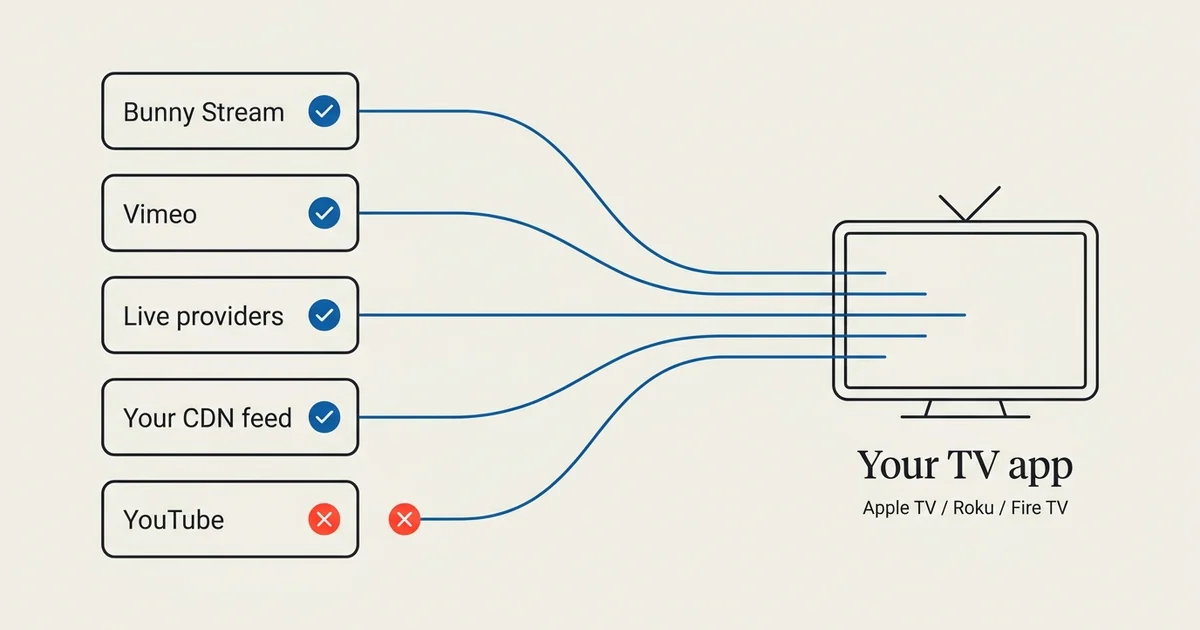
A video host works for a TV app when it does two things: serve directly-streamable video and expose a library an app can read. As of July 2026, four kinds of source clear that bar for Apple TV, Roku, and Fire TV, and one platform that most people assume will work does not: YouTube.
This guide explains what makes a host TV-app ready, compares the realistic options (Bunny Stream, Vimeo, live-stream providers, and your own CDN or feed), and shows why YouTube and social platforms are a dead end for a native TV app. If you’re deciding where to host video so you can get it on the living-room screen, start here.
What makes a video host “TV-app ready”
Not every place you can put a video can feed a TV app. A native app on Apple TV, Roku, or Fire TV has two hard requirements, and a host either meets them or it doesn’t.
Directly streamable video
TV apps play adaptive HTTP streams, usually HLS (.m3u8), or progressive MP4. The host has to serve your video in one of those formats over a URL the app can open. A page that only plays inside a website player, like a YouTube watch page, doesn’t qualify, because the app can’t reach the underlying stream.
A library an app can read
The second requirement is a way for the app to know what videos you have. That’s either a structured library the app builder can pull through an API (Bunny Stream, Vimeo) or a feed you provide (HLS, JSON). Without it, there’s nothing to fill the app with, and no way to keep it in sync.
Every recommendation below is really an answer to these two questions: can a TV app stream it, and can a TV app read the library?
The short list, compared
Here are the realistic sources for a TV app, and how they stack up.
| Source | Best for | How a TV app connects | Who pays for hosting |
|---|---|---|---|
| Bunny Stream | On-demand libraries you host affordably | Connect your account, collections become playlists | You, on Bunny |
| Vimeo | Creators already managing video in Vimeo | Connect your account, showcases become playlists | You, on Vimeo |
| Viloud | 24/7 FAST channels with a schedule | Paste your channel ID, the stream and its videos both come across | You, on Viloud |
| Boxcast / Resi / StreamSpot | Live streaming (services, games, events) | Your live feed appears automatically | You, on the provider |
| Own CDN + HLS / JSON feed | Custom setups and existing infrastructure | Paste your feed or stream URL | You, on your CDN |
| YouTube / social platforms | Nothing (for a native TV app) | Not possible | n/a |
With Tappla, all five working sources feed the same native apps, so the choice is about where your video lives, not about which app you can build.
Bunny Stream
Bunny Stream is the video product from Bunny.net: you upload video, it encodes to HLS, stores it, and serves it from a global CDN, with collections and automatic thumbnails.
Best for
Organizations that want an affordable, no-frills home for an on-demand catalog and don’t already use Vimeo. Bunny’s pricing is usage-based and tends to be low for a modest library.
How it connects
Tappla added a one-step Bunny Stream connection in 2026: you paste your Library ID, API Key, and CDN Hostname, and your whole library flows into the app, with each collection becoming a playlist. Full walkthrough in turning Bunny Stream videos into a TV app.
Vimeo
Vimeo is the most established source for a Tappla app. If your video is already organized into Vimeo showcases and folders, that structure carries straight through to the TV.
Best for
Creators and organizations already paying for Vimeo who want to reuse their existing library and organization without moving anything.
How it connects
You connect your Vimeo account, and Tappla syncs your showcases, videos, thumbnails, and metadata. A Vimeo plan with API access is required for the app to read your files. Full walkthrough in putting Vimeo videos on Roku, Apple TV, and Fire TV.
Viloud
Viloud is the odd one out here, because it is not a host in the same sense. It assembles videos into a 24/7 channel with a schedule, the FAST format, and streams the result continuously.
That makes it worth a mention even if you only want on-demand, because a Viloud channel carries both: the broadcast, and the library it is built from. Tappla reads both, so the channel becomes your app’s live row and its videos become a browsable playlist. The connection needs one channel ID and no API key. Full walkthrough in putting a Viloud channel on Apple TV, Roku and Fire TV.
Live-stream providers
If your priority is live, not on-demand, the host that matters is your live-streaming provider: Boxcast, Resi, StreamSpot, and similar services.
Best for
Churches streaming services, sports networks covering games, and anyone whose core content is a live event. Live and on-demand can sit in the same app.
How it connects
Your live feed from the provider shows up in the app automatically when you go live, alongside any on-demand rows. This is how most churches and ministries end up combining a weekly live service with an archive.
Your own CDN or feed
If you already run your own hosting or have a custom setup, you don’t need to move. Tappla can read a raw HLS endpoint or a JSON feed.
Best for
Media operations with existing infrastructure, developers, and anyone who wants full control of hosting and just needs the TV app on top.
How it connects
You paste your HLS (.m3u8) URL or JSON feed. If your CDN doesn’t produce a feed, Tappla can generate one from your videos, so a plain CDN with files still works.
What doesn’t work: YouTube and social platforms
YouTube is the single most common assumption we correct. Apple TV, Roku, and Fire TV do not allow third-party apps to play videos straight from YouTube, and the players can’t open a YouTube watch URL as a stream. The same goes for Facebook, Instagram, and TikTok.
This isn’t a Tappla limitation, it’s a platform and terms-of-service rule. The fix is straightforward: put your own content on a host from the list above (Bunny Stream is the quickest to start), and the TV app reads from there instead. If your catalog only lives on YouTube today, that migration is the real first step, and we cover it in can you turn a YouTube channel into a TV app?.
How to choose
The decision comes down to three questions:
- Is your content mostly live or mostly on-demand? Live points you to a streaming provider (Boxcast, Resi). On-demand points you to Bunny Stream or Vimeo. Both at once, running to a schedule, points you to Viloud.
- Do you already pay for a host? If you’re on Vimeo, reuse it. If not, Bunny Stream is usually the cheapest place to start an on-demand library.
- Do you run your own infrastructure? Then a CDN plus an HLS or JSON feed keeps you in full control.
Whatever you pick, you keep hosting where you choose. Tappla is the app layer on top, not the host.
From host to TV app
Once your video is on a TV-app-ready host, the rest is the same regardless of which one you chose:
- Connect the source in Tappla.
- Organize your content into rows, playlists, live and on-demand.
- Brand the app with your logo, colors, icon, and banner.
- Tappla builds and signs the native apps.
- Publish each app under your own store account, including Fire TV to the Amazon Appstore (delivered via apps.tappla.com).
See the platform specifics for Apple TV, Roku, and Fire TV, or the step-by-step Fire TV guide for a full walkthrough.
Summing it up
The best video host for a TV app is the one you already use, as long as it serves streamable video and exposes a library. Bunny Stream and Vimeo cover on-demand, live-stream providers cover live, and your own CDN covers custom setups. YouTube and social platforms don’t work for a native app, so owned hosting is the starting point. Pick the source that fits your content, and the same app ships to Apple TV, Roku, and Fire TV.
Frequently asked questions
What’s the best video host for building a TV app?
There isn’t one single answer, it depends on your content. Bunny Stream and Vimeo are best for on-demand libraries, live-stream providers like Boxcast and Resi are best for live content, and your own CDN with an HLS or JSON feed is best for custom setups. All of them can feed the same native Apple TV, Roku, and Fire TV apps.
Can I build a TV app from YouTube?
No. Apple TV, Roku, and Fire TV don’t allow apps to play videos straight from YouTube, and the players can’t stream a YouTube URL. To get your own content on the TV, host it somewhere a TV app can read, such as Bunny Stream, Vimeo, or a CDN, and build the app from there.
Is Bunny Stream or Vimeo better for a TV app?
Both work well. Choose Vimeo if you already manage your videos there and want to reuse your showcases. Choose Bunny Stream if you want a low-cost place to host an on-demand library and don’t already use Vimeo. Either way, your collections or showcases become playlists in the app.
Do I have to move my videos to use Tappla?
No. You keep hosting your video wherever it already lives and keep paying that host directly. Tappla reads from your source and builds the app around it, so there’s no migration unless your content is only on YouTube.
Can I combine live and on-demand in one app?
Yes. A live feed from a provider like Boxcast or Resi can sit alongside an on-demand library from Bunny Stream, Vimeo, or your CDN in the same app. This is common for churches and sports networks.
What video format does a TV app need?
Adaptive HLS (.m3u8) or progressive MP4, served over a URL the app can open. TV-app-ready hosts deliver this by default. The reason YouTube doesn’t work is that it doesn’t expose the underlying stream that way.
Put your channel on the TV — in days.
Connect the video source you already run and ship native apps under your own accounts. From $49/month.