How to Put Your FAST Channel on Your Own TV Apps
How to run your 24/7 FAST channel in your own Apple TV, Roku, Fire TV and Android TV apps, next to or instead of FAST aggregators.
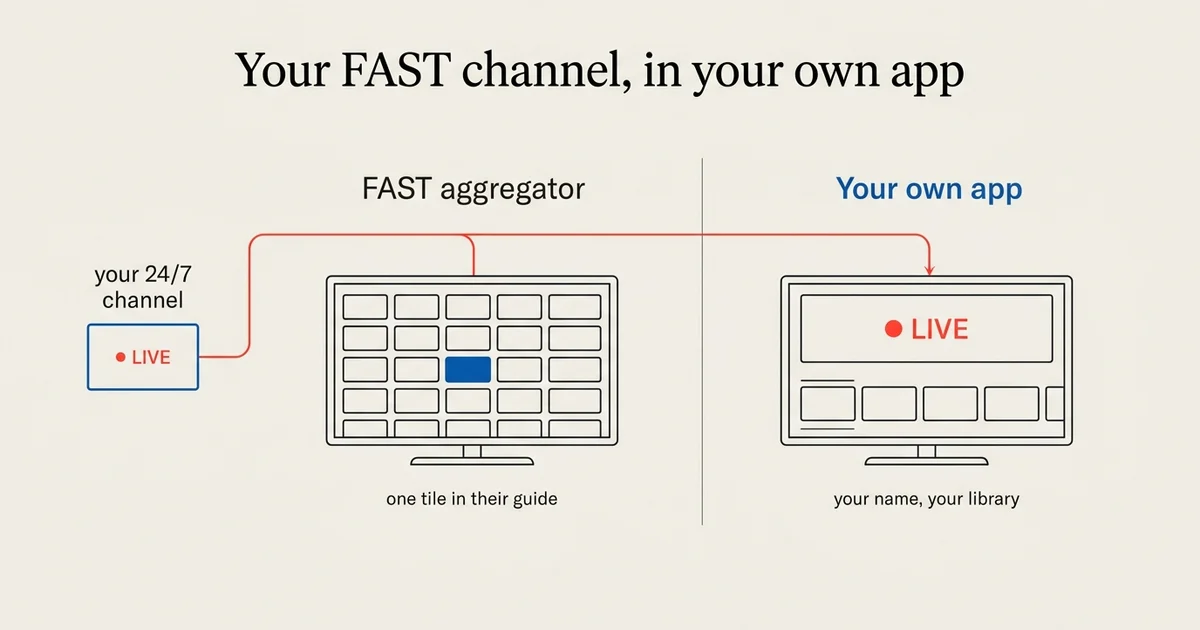
A FAST channel is a free, ad-supported linear channel: one 24/7 stream that plays the same programme for everyone, the way television always has. As of October 2026, there are two ways to get one onto a living-room screen. You can place it with a FAST aggregator, or you can run it in your own app on the four big TV platforms: Apple TV, Roku, Fire TV and Android TV.
This guide explains the difference between the two, what a channel needs before it can appear in an app, how the 24/7 stream and the videos behind it fit together, and what an app of your own does not do for you. We build those apps at Tappla, so read the comparison with that in mind.
What a FAST channel is
FAST stands for free ad-supported streaming television. The format borrows everything from broadcast except the broadcast tower.
Linear, not on demand
A viewer does not choose an episode. They tune in and watch whatever is on, exactly like a cable channel. That is the point: no decisions, no search, just a channel that is always playing.
Free to the viewer
Nobody pays to watch. The channel is financed by advertising, by an organization that wants the reach, or both.
One continuous stream
Technically, a FAST channel is a single live stream, usually HLS, produced by a playout system that turns a library of videos into a schedule. The playout is where the programming happens. Everything downstream just plays the stream.
Two ways onto the TV
Through a FAST aggregator
Aggregators are the big free TV services that bundle hundreds of channels into one guide, often built into the TV itself. A channel gets in through a distribution agreement. Their strength is reach: viewers already have the service open.
What you give up is the frame. The channel sits in someone else’s guide, between someone else’s channels, under someone else’s brand, and the agreement decides how ads and revenue work.
In your own apps
The other route is an app with your name on it, in the Apple App Store, the Roku Channel Store, the Amazon Appstore and Google Play. Viewers install it once and your channel is a tile on their home screen.
What you gain is the relationship: your logo, your layout, your listing, and room for more than the live stream. What you give up is the built-in audience. People have to find and install your app.
Both, not either
The two routes do not exclude each other. Many channels use aggregators for discovery and their own apps for the viewers who want more than the stream. The rest of this guide is about the second route.
What a channel needs before it can be in an app
A real stream URL
A TV app needs a stream it can open directly, typically an HLS address ending in .m3u8. Most playout systems give you one. A link to a web player or a social video page is not enough; YouTube in particular cannot be used.
A stream that stays up
A 24/7 channel has to be on air when the viewer opens the app. If the playout goes down, the Live row shows nothing, and no app can fix that.
Rights for every platform
Whatever plays on your channel has to be licensed for distribution on connected TVs, not only on the web. That is a question for your content agreements, not for the app.
How the channel appears in your app
The 24/7 stream becomes your Live row
The stream takes the top row of the app. On Roku and Fire TV it gets the live presenter those platforms use for something that is on air. A viewer who opens the app and wants whatever is playing is one click away from it.
The videos behind it become a library
If your playout system exposes the videos it schedules, they can appear as their own rows: titles, thumbnails, descriptions. A viewer who does not want to join halfway through an episode starts it from the beginning. With Viloud this happens automatically from one channel ID.
Several channels, one app
A network with more than one channel does not need more than one app. With Viloud, each channel becomes its own playlist in the same app.
Live and on demand side by side
If you also host videos on Vimeo, Bunny Stream or a JSON feed, they sit next to the live channel in the same app. Linear for viewers who want to lean back, on demand for everyone who missed something.
What your own app does not do
It does not insert ads
The A in FAST is advertising, and in an app the ads have to be in the stream. If your playout or ad partner stitches ads into the stream on the server side, they play like everything else in it. Tappla does not insert, sell or measure ads, so plan advertising on the streaming side.
It is not the playout
Tappla builds the apps around a channel that already exists. Scheduling, encoding and the stream itself stay with your playout system. Our guide to Viloud covers one that connects directly.
It does not bring the audience
An app of your own is a home for viewers who look for you. Getting found still takes promotion: on air, on your website, in the places your audience already is.
Own apps vs. a FAST aggregator at a glance
| FAST aggregator | Your own TV apps | |
|---|---|---|
| Brand on screen | The aggregator’s | Yours |
| Store listing | None of your own | In your own developer accounts |
| Built-in audience | Yes | No, viewers install your app |
| How you get in | Distribution agreement | You publish |
| Ads | Handled under the agreement | In your stream, on your side |
| On-demand library | Depends on the service | Yes, next to the live channel |
| Members-only content | No | Yes, if you want it |
Step-by-step: your channel in your own apps
- Get your stream URL from your playout system, or your channel ID if you use Viloud.
- Connect it in the Tappla dashboard as your video source or live stream.
- Add on-demand videos if you have them, from Vimeo, Bunny Stream or a feed.
- Brand the app with your logo, colours and layout.
- Preview it in the browser before anything is submitted.
- We build and sign the apps for the platforms you choose, and you publish them under your own developer accounts.
The platforms in detail: Apple TV, Roku, Fire TV and Android TV. How the four fit together: OTT app development.
Who this is for
Channel operators whose 24/7 channel already runs and whose viewers ask whether there is an app. Community and diaspora networks with an audience spread across a country. Local and public-access stations that broadcast around the clock.
What it costs
Tappla charges a flat monthly price per plan: one native app (Roku, Fire TV or Android TV) or all platforms including Apple TV. Your playout system is billed separately, and the developer accounts are paid to the platforms directly. Current prices are on the pricing page.
Summing it up
A FAST aggregator gives a channel reach. Your own apps give it a home: your name on the screen, a listing that belongs to you, and room for an on-demand library next to the live stream. Most channels end up with both. If yours already runs as a 24/7 stream, the app side takes days, not months.
Frequently asked questions
What is a FAST channel?
A FAST channel is a free, ad-supported linear streaming channel: one 24/7 stream that plays a schedule, like a traditional TV channel, delivered over the internet instead of cable or antenna.
Can I put my FAST channel on Roku, Apple TV and Fire TV myself?
Yes, in your own app. You connect the channel’s stream to an app builder like Tappla, and the apps are published under your own developer accounts. Being included in a platform’s own free TV service is a separate route that needs a distribution agreement.
Do I need a playout system?
Yes. The playout system turns your videos into the 24/7 stream. Tappla builds the TV apps around that stream; it is not a playout itself. Viloud is one playout that connects directly with a channel ID.
Will my ads play in the app?
Ads that are stitched into the stream on the server side play as part of the stream. Tappla does not insert, sell or measure ads itself.
Can I have several channels in one app?
Yes. With Viloud, each channel becomes its own playlist in the same app, so a network does not need a separate app per channel.
Can viewers also watch episodes on demand?
Yes. The videos behind the channel, or a separate on-demand library from Vimeo, Bunny Stream or a JSON feed, appear as rows next to the live channel.
Is my own app instead of a FAST aggregator?
It does not have to be. Aggregators bring discovery, your own apps bring a branded home and an on-demand library. Many channels run both.
How long does it take?
Connecting the channel and branding the app takes a day or two. Store review adds a few days per platform.
Put your channel on the TV — in days.
Connect the video source you already run and ship native apps under your own accounts. From $49/month.