Can You Turn a YouTube Channel Into a TV App? (2026)
Can you build an Apple TV, Roku, or Fire TV app from a YouTube channel? The honest 2026 answer, why it doesn't work directly, and what actually does.
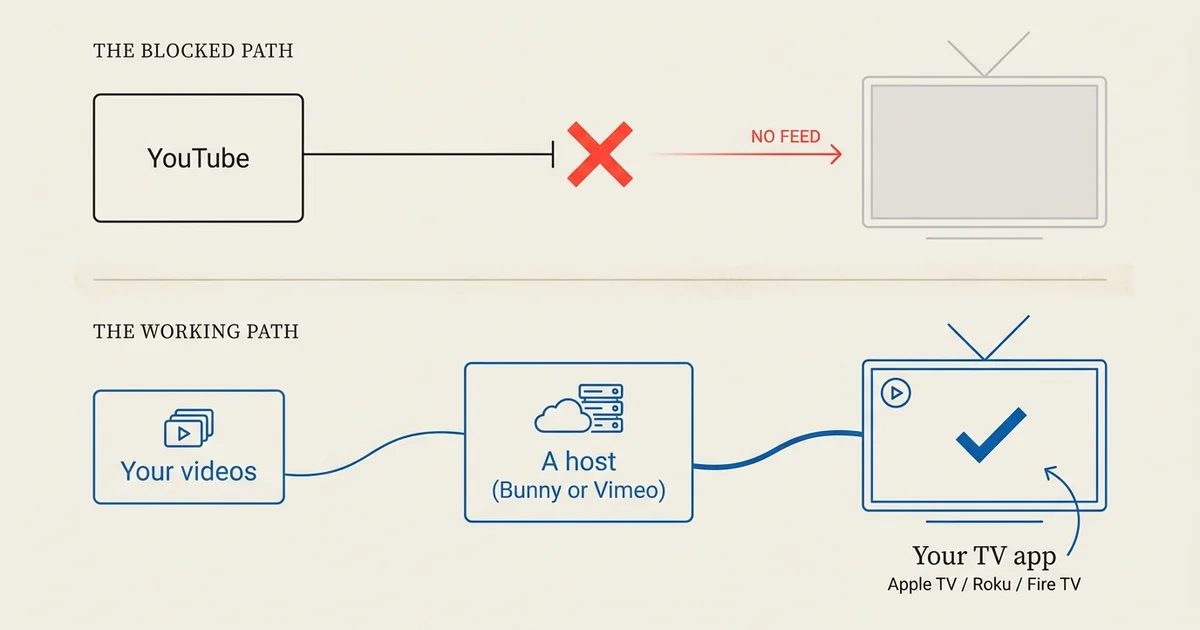
You cannot build a native Apple TV, Roku, or Fire TV app that plays videos straight from a YouTube channel. As of July 2026, the three major TV platforms don’t allow it, and the reason is specific. There is a clear path to get your own content on the TV anyway, and this guide walks through both: why the direct route is closed, and what actually works.
If you have a packed YouTube channel and want it on the living-room screen as your own branded app, read this before you start.
The short answer
A native TV app can’t stream from YouTube. Apple TV, Roku, and Fire TV do not permit third-party apps to play videos directly from YouTube, and the players can’t open a YouTube watch page as a stream. So there’s no way to point a custom app at your YouTube playlist and have it play.
That’s the rule. The useful part is what you do instead, which depends on whose content it is.
Why it doesn’t work
Two separate things block the direct route, and it helps to see them apart.
The platforms don’t allow it
Apple, Roku, and Amazon each have terms that keep third-party apps from playing YouTube content. YouTube itself restricts where its player and streams can be embedded. This is a policy wall, not a technical trick you can route around, and app stores reject apps that try.
There’s no stream a TV app can open
Even setting policy aside, a YouTube watch URL is a web page, not a video stream. A TV app plays adaptive HLS or progressive MP4 from a URL it can open. YouTube doesn’t expose the underlying file that way, so the app has nothing to play. Our guide to what makes a video host TV-app ready covers this requirement in detail.
What actually works: host your own content
The path to a TV app runs through hosting, not through YouTube. You put your videos on a host a TV app can read, then build the app from there.
Move your own videos to a host
If the videos are yours, you’re free to put them on a video host. The quickest to start is Bunny Stream; if you already use Vimeo, that works too. Either one connects to Tappla in a step, and your library becomes a branded app on Apple TV, Roku, and Fire TV.
Then build the app around it
Once your content sits on a host, Tappla reads the library and generates the native apps. Your videos, thumbnails, and playlists carry through, and the app stays in sync as you add more. You keep hosting where you choose; Tappla is the app layer on top.
The catch: content you don’t own
There’s an honest complication if your channel includes videos that aren’t yours, like clips from friends, partners, or a network you curate.
Rights follow the owner, not the channel
Hosting and publishing someone else’s video takes that owner’s permission. Curating videos on a YouTube playlist doesn’t give you the right to redistribute them in your own app. The rights follow whoever made the video.
The app stores check this too
Apple, Roku, and Amazon require whoever submits an app to hold the rights to what’s in it. So third-party content isn’t just a courtesy issue; it’s a submission requirement. The clean way is a licensing or revenue-share arrangement with each owner, or getting their videos on a host with their permission.
Who this affects
This comes up most for two kinds of creator, and the path differs.
Single-creator channels
If it’s your own content, the fix is straightforward: host your videos, then build. There’s nothing legally in the way, and it’s usually a matter of days once the video is on a host.
Curators and aggregators
If you fill a channel with other people’s videos, the content is the hard part, not the app. You need licensing or rights agreements with each owner, or their videos on a host with their permission, before your app can carry them. Some creators solve this with a revenue-share arrangement, treating the channel like a distribution deal rather than a playlist.
Either way, the app itself is the easy part once the content is on a host you control.
What about tools that claim to stream YouTube on a TV?
There are browser extensions and casting tricks that push a YouTube video to a Roku or a Fire TV Stick. Those are personal casting from a phone or laptop, not a branded app your audience installs and opens on its own. They don’t give you a listing on the TV, your name on the home screen, or an app you own.
For your own channel, hosting your content and building a real app is the difference between casting a link once and having an owned app that anyone can install. That’s the path the app stores accept and the one that puts your brand on the screen.
From YouTube to a real TV app
Here’s the realistic sequence:
- Sort out rights. Your own videos are fine. For anyone else’s, get permission or a license.
- Host the content. Put the videos on Bunny Stream, Vimeo, or your own CDN.
- Connect the host in Tappla. One step, and your library flows in.
- Brand and build. Tappla generates the native apps for Apple TV, Roku, and Fire TV.
- Publish. Ship each app under your own store account, including Fire TV to the Amazon Appstore (we deliver it via apps.tappla.com).
Summing it up
You can’t make a native TV app that plays from YouTube, because the platforms don’t allow it and there’s no stream to open. What you can do is host your own content and build the app from there, which is fast once the video is on a host. If your channel includes videos you don’t own, the first step is rights, not code. Start with where to host your video for a TV app, then build on Apple TV, Roku, or Fire TV.
Frequently asked questions
Can I make an Apple TV or Roku app from my YouTube channel?
No. Apple TV, Roku, and Fire TV don’t allow apps to play videos straight from YouTube, and a YouTube URL isn’t a stream a TV app can open. To get your content on the TV, host it somewhere a TV app can read, such as Bunny Stream or Vimeo, and build the app from there.
Why won’t the TV platforms allow YouTube in a custom app?
It’s a combination of platform terms (Apple, Roku, Amazon) and YouTube’s own restrictions on where its content can be embedded. App stores reject third-party apps that try to play YouTube content, so it’s a policy wall rather than a technical gap.
I own all my videos on YouTube. What’s the fastest path to a TV app?
Put your videos on a host a TV app can read, then connect it. Bunny Stream is the quickest to start; Vimeo works if you already use it. Tappla then builds a branded app for Apple TV, Roku, and Fire TV from your library.
Can I include other people’s YouTube videos in my app?
Only with their permission. Curating videos on a playlist doesn’t give you the right to redistribute them, and the app stores require whoever publishes the app to hold the rights to the content. A licensing or revenue-share agreement with each owner is the clean route.
Is there any way to embed YouTube on a TV app?
Not in a custom native app you own. The only YouTube on those platforms is YouTube’s own app. For your own channel, hosting your content elsewhere and building your own app is the path that works and that the stores accept.
How long does it take once my videos are hosted?
Once your content is on a host, connecting it and branding the app takes a day or two, and Fire TV’s Amazon Appstore review is usually quick. The hosting and rights work is the part that takes planning; the app is quick.
Put your channel on the TV — in days.
Connect the video source you already run and ship native apps under your own accounts. From $49/month.