How to Build an Amazon Fire TV App Without Coding (2026 Guide)
How to build a native Amazon Fire TV app in 2026 without coding: what you need, how it publishes to the Amazon Appstore under your own free developer account, how long it takes, and a step-by-step walkthrough.
Amazon has sold more than 200 million Fire TV devices worldwide, which makes Fire TV one of the largest living-room audiences you can reach. A Fire TV app puts your video on that screen as a real app, not a link and not a web page.
In this guide we’ll cover everything you need to build your own Amazon Fire TV app in 2026 without coding: what a Fire TV app actually is, how it reads the video you already stream, how it reaches viewers on the Amazon Appstore, how much it costs, and a step-by-step walkthrough.
Whether you run a local TV channel, a church, a sports network, or a media brand, the goal here is to make getting on Fire TV as fast and accessible as possible. Let’s get started.
Why build a Fire TV app?
Fire TV is Amazon’s streaming platform: the Fire TV Stick, Fire TV Cube, and Fire TV Edition smart TVs. It’s one of the two or three platforms nearly every organization with video should be on, alongside Apple TV and Roku.
Building your own Fire TV app gives you:
- A living-room presence: your audience opens your app on the TV, not a browser tab.
- Your brand on the home screen: your logo, your name, your layout. An owned channel, not a listing inside someone else’s app.
- Reach with almost no friction: viewers find your app in the Amazon Appstore and install it in seconds, just like any other app.
What a Fire TV app actually is
A Fire TV app is a real native Android app. Fire OS, the system that runs Fire TV devices, is built on Android, so a Fire TV app is a native Android TV application built with the standard Android TV UI toolkit (Leanback), not a web view wrapped in a shell.
That matters for two reasons. First, a native app feels right on a TV: real D-pad navigation, a proper home screen, fast playback. Second, because it’s a standard Android TV app, the same build can run on Fire TV and on Android TV / Google TV devices from one codebase.
Three ways to get a Fire TV app
There are three realistic paths to a custom Fire TV app, and they differ enormously in cost and time.
Custom agency development: Hire an Android TV developer to build the app from scratch. Complete control, but it typically runs into the thousands of dollars and weeks or months of work, plus ongoing maintenance.
Do it yourself in Android Studio: Build a Leanback app yourself in Kotlin. Free in tooling, but it needs real Android TV development skills and time you probably don’t have.
OTT app builder: Tools like Tappla connect your existing video and generate a native Fire TV app from a pre-built template. Fast, affordable, and no coding required.
For almost everyone who already has the video and just wants it on the TV, the app-builder path is the right one. Let’s walk through it.
How to build a Fire TV app without coding
An OTT app builder takes the video you already stream and turns it into a finished native Fire TV app. The main thing that separates builders is how they handle your video, so it helps to understand how a Fire TV app gets your content in the first place.
How Fire TV apps read your video
You don’t upload your videos into the Fire TV app itself. Instead, the app reads from wherever your video already lives: Vimeo, a video host like Bunny Stream, a CDN, a live-streaming provider like Boxcast or Resi, or your own HLS / JSON feed.
The link between your hosting and your app is a video feed: a small piece of data that lists your video URLs and their metadata (title, thumbnail, category, live vs on-demand). When someone opens your Fire TV app, it loads the feed and fills itself with your content. Update the source, and the app updates itself, with no re-submission and no re-upload.
This is why you don’t have to migrate your video library to get on the TV. You keep your setup; the app just reads from it.
Publishing your Fire TV app to the Amazon Appstore
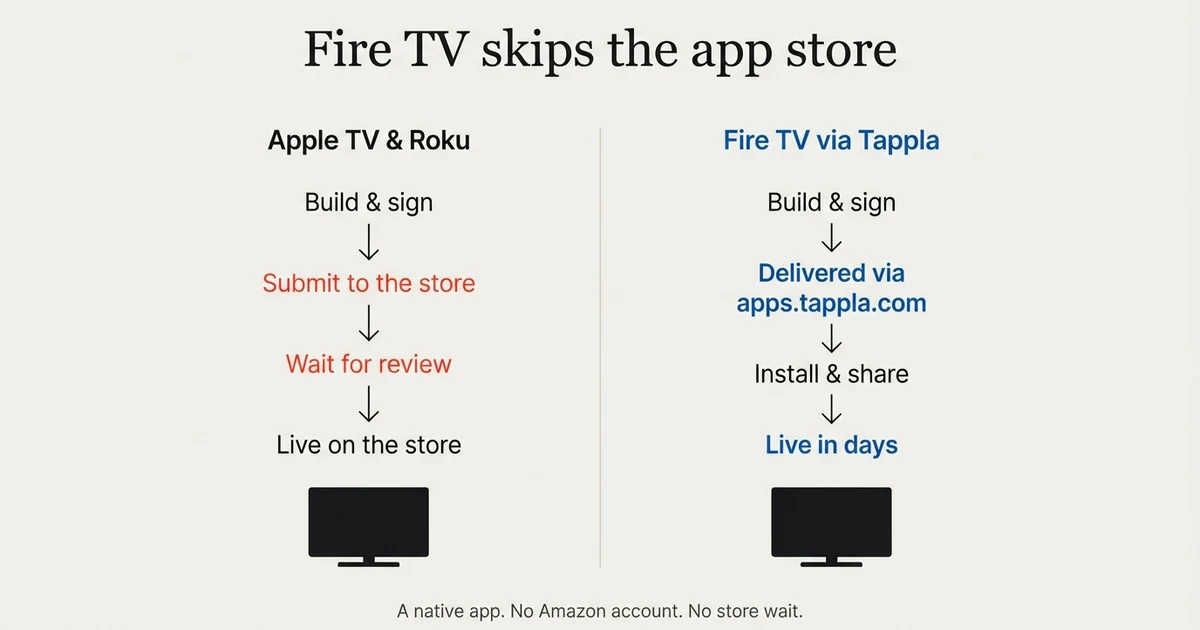
Like Apple TV and Roku, your Fire TV app goes in its platform’s store, the Amazon Appstore, so viewers find it by searching on their Fire TV and install it in one click.
On Apple TV you submit to the App Store under your own Apple Developer account ($99/year); on Roku you publish to the Channel Store under your own Roku account (free); on Fire TV you publish to the Amazon Appstore under your own Amazon developer account, which is also free.
With Tappla, we build, sign, and package your native Fire TV app, then deliver it to you via apps.tappla.com together with ready-made store images and a step-by-step submission guide. You publish it under your own account, so the listing is permanently yours, and if you get stuck, we can pre-create the listing and walk you through the Amazon setup step.
The app is yours, branded as yours, and discoverable by your whole audience in the store.
Fire TV vs Android TV and Google TV
Because a Fire TV app is a standard Android TV app, the same build runs on Android TV and Google TV devices too. If you’ve searched for an “Android TV app builder,” this is the same thing: one native app across several living-room platforms. The difference is the store: Android TV apps are published on Google Play instead of the Amazon Appstore. See Android TV app development for that route, and the Fire TV app builder page for the Amazon specifics.
What it costs
The cost of a Fire TV app depends entirely on which path you take.
Custom agency development typically starts in the thousands of dollars and adds ongoing maintenance. Building it yourself is “free” in software but costs you real Android TV development time.
With an app builder like Tappla, a single Fire TV app is $49/month, and all three native platforms together (Apple TV, Roku, and Fire TV) are $149/month. If you only need the managed video feed to power your own setup, that’s $24/month. An Amazon developer account is free, so there’s no platform fee on top for Fire TV. Full details are on the pricing page.
The short version: you keep hosting your video where it already is, and a single native Fire TV app is $49/month, published under a free Amazon developer account.
Step-by-step: from video source to Fire TV app
Here’s the whole process end to end with an app builder:
- Connect your video. Link your Vimeo account, your live-stream provider, or paste your feed / video URLs. If your CDN doesn’t provide a feed, Tappla generates one for you.
- Organize your content. Group your videos into categories, playlists, live, and on-demand rows: the layout viewers will see on the TV.
- Brand the app. Add your logo, colors, app icon, and banner so the app looks like yours on the Fire TV home screen.
- We build and sign it. Tappla generates the native Android TV app, signs it, and packages it.
- Publish to the Amazon Appstore. We deliver the finished app plus store images and a submission guide via apps.tappla.com; you publish it under your own free Amazon developer account (and we can pre-create the listing for you).
- Ship updates automatically. New videos in your source appear in the app on their own, because the app reads your live feed.
From connecting a source to a branded, installable Fire TV app is usually a matter of days.
Fire TV, Apple TV, or Roku: which should you start with?
You don’t have to choose. Because all three read the same video source, you can ship one platform now and add the others from the same feed later.
- Start with Fire TV for a huge device base and a free developer account: build your Fire TV app.
- Add Roku to reach the largest dedicated streaming-device audience: create a Roku channel.
- Add Apple TV for a native tvOS app under your own developer account: build an Apple TV app.
Organizations like local and government TV channels, churches and ministries, and sports networks typically end up on all three.
Summing it up
That’s how to build your own Amazon Fire TV app in 2026 without coding. You keep hosting your video where it already lives, an app builder turns it into a real native Android TV app, and you publish it to the Amazon Appstore under your own free Amazon developer account, with the signed app, store images, and a step-by-step guide delivered to you via apps.tappla.com.
If you’re ready, start on the Fire TV app builder page, or see how the same feed powers Apple TV and Roku.
Frequently asked questions
Do I need an Amazon Developer account to build a Fire TV app?
Yes, a free one. You publish your app to the Amazon Appstore under your own Amazon developer account, which is free (unlike Apple’s, there’s no yearly fee). Tappla builds and signs the native app and delivers it via apps.tappla.com with ready-made store images and a step-by-step submission guide, and can pre-create the listing for you.
Is a Fire TV app a real native app or a web wrapper?
A real native app. Fire OS is built on Android, so a Fire TV app is a native Android TV application built with the standard Leanback UI toolkit: native navigation, a real home screen, and proper playback, not a web view in a shell.
How do my viewers find and download my Fire TV app?
Once it’s published, your app is in the Amazon Appstore. Viewers search for it by name on their Fire TV and install it in one click, just like any other app, with no sideloading and no technical steps on their end.
Does this work on Android TV and Google TV too?
Yes. Because a Fire TV app is a standard Android TV app, the same build runs on Android TV and Google TV devices. If you were looking for an Android TV app builder, this is the same native app, published on Google Play instead of the Amazon Appstore. See Android TV app development.
How much does an Amazon Fire TV app cost?
With Tappla, a single Fire TV app is $49/month and all three native platforms (Apple TV, Roku, and Fire TV) are $149/month; the managed video feed on its own is $24/month. The Amazon developer account you publish under is free, so there’s no platform fee for Fire TV. Custom agency development, by contrast, typically starts in the thousands of dollars. See the pricing page for details.
How long does it take to build a Fire TV app?
Connecting your source and branding the app takes a day or two. After that you submit it to the Amazon Appstore; the review is usually quick, so most organizations go from connecting a video source to a live Fire TV app within days.
Can I use my Vimeo videos or a live stream in a Fire TV app?
Yes. Tappla reads from the video you already run, including Vimeo, a CDN, or a live-streaming provider like Boxcast, Resi, or StreamSpot, and can combine live and on-demand content in one app. See the list of supported video sources.
Can I put the same content on Apple TV and Roku?
Yes. All three platforms read the same video source, so once your feed is set up you can add Apple TV and Roku without redoing any of the video work.
Put your channel on the TV — in days.
Connect the video source you already run and ship native apps under your own accounts. From $49/month.