Bunny Stream to a TV App: Apple TV, Roku & Fire TV
How to turn your Bunny Stream videos into native Apple TV, Roku, and Fire TV apps in 2026: connect your library in one step, keep your host, no coding required.
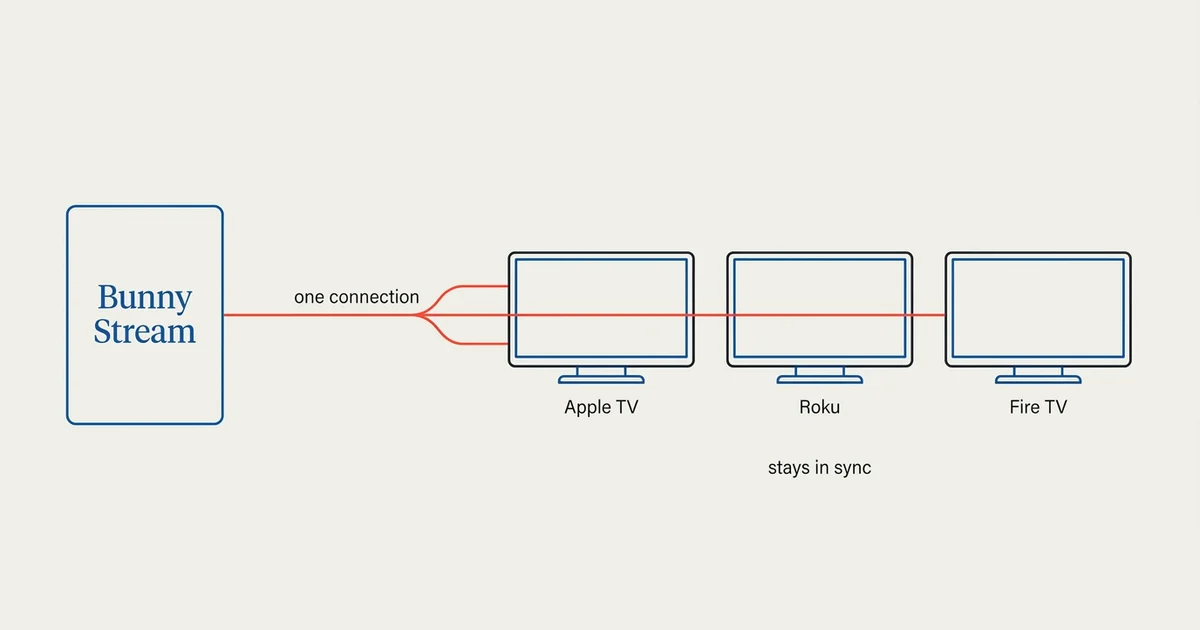
Bunny Stream is a video hosting and delivery product, not a TV platform. It stores, encodes, and streams your videos over a global CDN, but it does not put them on a living-room screen. A Tappla app does. As of July 2026, Tappla connects a Bunny Stream library to a native app on all three major living-room platforms, Apple TV, Roku, and Fire TV, in a single step, and keeps it in sync automatically.
This guide covers what Bunny Stream does, why your videos don’t automatically show up on a TV, how the one-step connection works, which three values you need, and a step-by-step from a Bunny Stream library to a branded app on all three platforms.
Whether you run a local or government TV channel, a church, a sports network, or a media brand, if your video already lives on Bunny Stream, this is the fastest way to get it on the TV.
What Bunny Stream does
Bunny Stream is the video product from Bunny.net. You upload your videos, Bunny encodes them into adaptive HLS, stores them, and serves them from its CDN. It also organizes videos into collections and generates thumbnails automatically.
What Bunny Stream gives you is a reliable, affordable place for your video to live and stream from. What it does not give you is a presence on Apple TV, Roku, or Fire TV. Those are separate platforms, and reaching them takes a native app.
Why Bunny videos don’t just appear on a TV
A living-room device does not browse the web the way a phone does. To show your video, Apple TV, Roku, and Fire TV each need a native app built for that platform, and that app needs to know where your videos are and how to play them.
Bunny Stream hands you streamable video (HLS), which is exactly what a native TV app can play. The missing piece is the app itself: the branded, installable software that reads your Bunny library and renders it as rows, playlists, and a home screen on the TV. That is the layer Tappla builds.
How Tappla connects Bunny Stream to a TV app
Tappla reads from wherever your video already lives and turns it into native TV apps. Bunny Stream is one of those sources. You connect your own Bunny account once, and Tappla does the rest.
Your Bunny library, synced automatically
You don’t re-upload anything. You connect your Bunny Stream library, and Tappla pulls in every finished video: titles, thumbnails, and durations included. Your app fills itself with your content, no manual entry.
Collections become playlists
If you organize videos into collections in Bunny Stream, Tappla maps each collection to a playlist in your app. Videos that aren’t in a collection go into a default row. The structure you already keep in Bunny carries straight through to the TV.
It stays in sync
Tappla re-checks your Bunny library on a schedule. When you add, rename, or remove a video in Bunny, your app updates on its own, with no re-submission and no re-upload. There is also a manual re-sync in the dashboard if you want the latest immediately.
What you connect: the three values
Connecting Bunny Stream takes three values, all on the same “API” screen inside your Bunny Stream video library:
- Library ID: which Bunny Stream library to read.
- API Key: read access to that library.
- CDN Hostname: where your streams are served from, usually something like
vz-xxxxx.b-cdn.net.
You paste them into the Bunny Stream panel in your Tappla dashboard, and the connection validates on the spot. The full walkthrough is in the help center article on connecting Bunny Stream.
One requirement: Bunny Stream, not Bunny CDN
This works with Bunny Stream, the video-library product, not plain Bunny CDN storage. Bunny CDN is a file bucket with no library or metadata to read, so if you’re on CDN only, you switch on Bunny Stream first. It’s a quick change on your Bunny account.
Bunny Stream on Apple TV, Roku, and Fire TV
The same Bunny connection powers a native app on each platform, under your own accounts. You keep the video on Bunny; Tappla builds and ships the app.
Apple TV
Tappla builds a native tvOS app and signs it, and you submit it to the App Store under your own Apple Developer account. See Apple TV app development for how that works.
Roku
Tappla generates a Roku channel from the same feed, published to the Channel Store under your own free Roku account. See creating a Roku channel.
Fire TV
Fire TV publishes to the Amazon Appstore under your own free Amazon developer account. Tappla builds, signs, and delivers your Fire TV app via apps.tappla.com with store images and a step-by-step guide, ready to publish. See building a Fire TV app for the specifics, or our step-by-step Fire TV guide for how the delivery model works and how the same build runs on Android TV and Google TV.
Bunny Stream vs. other video sources
Bunny Stream is one of several sources Tappla can read. It sits alongside Vimeo, live-stream providers like Boxcast and Resi, and raw HLS or JSON feeds.
| Source | Best for | How it connects |
|---|---|---|
| Bunny Stream | On-demand libraries already hosted on Bunny | Connect your account, collections become playlists |
| Vimeo | Creators already managing videos in Vimeo | Connect your account, showcases become playlists |
| Boxcast / Resi | Live streaming (services, games, events) | Your live feed shows up automatically |
| HLS / JSON feed | Your own CDN or custom setup | Paste your feed or stream URL |
The point is the same across all of them: you keep hosting where you already do, and the app reads from it. Bunny Stream makes that connection a single step for anyone already on Bunny. For how the sources compare head to head, see our guide to the best video hosting for building a TV app.
What Bunny Stream and Tappla is not
Being straight about the boundaries saves everyone time.
Tappla builds the app, not the hosting or the checkout
Tappla is the app and distribution layer. It does not host your video (Bunny does that), and it does not process payments or run ads. If you sell access, you sell it on your own website with your own checkout, and Tappla unlocks the members-only rows in your app for whoever paid.
A TV app can’t play straight from YouTube
Apple TV, Roku, and Fire TV do not allow apps to play videos straight from YouTube, so a YouTube playlist can’t be pointed at directly. Your videos need to live on a host a TV app can read, and Bunny Stream is exactly that kind of host. Moving your catalog onto a host like Bunny is the step that gets you onto the TV.
Who this is for
This path fits anyone whose on-demand video already lives on Bunny Stream and who wants it on the living-room screen as a real, branded app:
- Local, government, and PEG-TV channels building an owned app.
- Churches and ministries putting sermons and services on the TV.
- Sports networks and media brands with a catalog on Bunny.
Step-by-step: from Bunny Stream to a TV app
Here’s the whole process end to end:
- Have your videos on Bunny Stream. Uploaded and finished encoding, organized into collections if you want playlists.
- Connect Bunny in Tappla. Choose Bunny Stream in your Video Source settings and paste your Library ID, API Key, and CDN Hostname.
- Tappla pulls your library. Titles, thumbnails, durations, and collections flow in automatically.
- Brand the app. Add your logo, colors, icon, and banner.
- We build and sign it. Tappla generates the native apps for Apple TV, Roku, and Fire TV.
- Ship and stay in sync. Publish each app under your own store account (Fire TV to the Amazon Appstore), and new Bunny videos appear in the app on their own.
From connecting Bunny to a branded, installable app is usually a matter of days.
What it costs
Your Bunny Stream hosting stays on your own Bunny account, billed by Bunny directly. Tappla is separate: a single native app (Roku, Fire TV or Android TV) is $49/month, all three native platforms together are $149/month, and the managed video feed on its own is $24/month. Full details are on the pricing page.
Summing it up
If your video is on Bunny Stream, getting it on Apple TV, Roku, and Fire TV no longer means exporting files or copying URLs by hand. You connect your Bunny library once, Tappla reads it, and your whole catalog becomes a branded native app on every major living-room platform, kept in sync automatically.
Start on the Fire TV app builder for the fastest path, or see how the same Bunny connection powers Apple TV and Roku.
Frequently asked questions
Can I turn my Bunny Stream videos into an Apple TV, Roku, or Fire TV app?
Yes. Tappla connects your Bunny Stream library and generates a native app for each platform. You connect your Bunny account once, and your videos, thumbnails, and collections flow into the app automatically and stay in sync.
Does this work with Bunny CDN, or only Bunny Stream?
It works with Bunny Stream, the video-library product with an API for videos and collections. Plain Bunny CDN storage doesn’t expose that library data, so if you’re on CDN only, you enable Bunny Stream first.
Do I have to move my videos off Bunny?
No. Your videos stay on your own Bunny Stream account and keep streaming from Bunny’s CDN. Tappla only reads the library and builds the app around it, so you keep your host and your billing with Bunny.
How do my Bunny collections show up in the app?
Each collection in your Bunny Stream library becomes a playlist in your app. Videos that aren’t in a collection go into a default row. Rename or reorganize in Bunny and the app follows on the next sync.
Can I put the same Bunny library on Apple TV, Roku, and Fire TV at once?
Yes. One Bunny connection powers all three native apps. You publish Apple TV, Roku, and Fire TV each under your own developer account (Apple’s is $99/year, Roku and Amazon are free), and we deliver the Fire TV app via apps.tappla.com ready for the Amazon Appstore.
Can I use my YouTube playlist instead of Bunny?
No. Apple TV, Roku, and Fire TV don’t allow apps to play videos straight from YouTube. Your videos need to live on a host a TV app can read, such as Bunny Stream, Vimeo, or a CDN, and then Tappla builds the app around that.
What do I need to connect Bunny Stream?
Three values from the “API” screen of your Bunny Stream video library: the Library ID, the API Key, and the CDN Hostname. You paste them into the Bunny panel in your Tappla dashboard and the connection validates immediately.
Put your channel on the TV — in days.
Connect the video source you already run and ship native apps under your own accounts. From $49/month.