How to Make an Apple TV App with Claude
Set up a native Apple TV app by chatting with Claude: brand it from your website, set the home-screen name, connect your videos and check what Apple still needs.
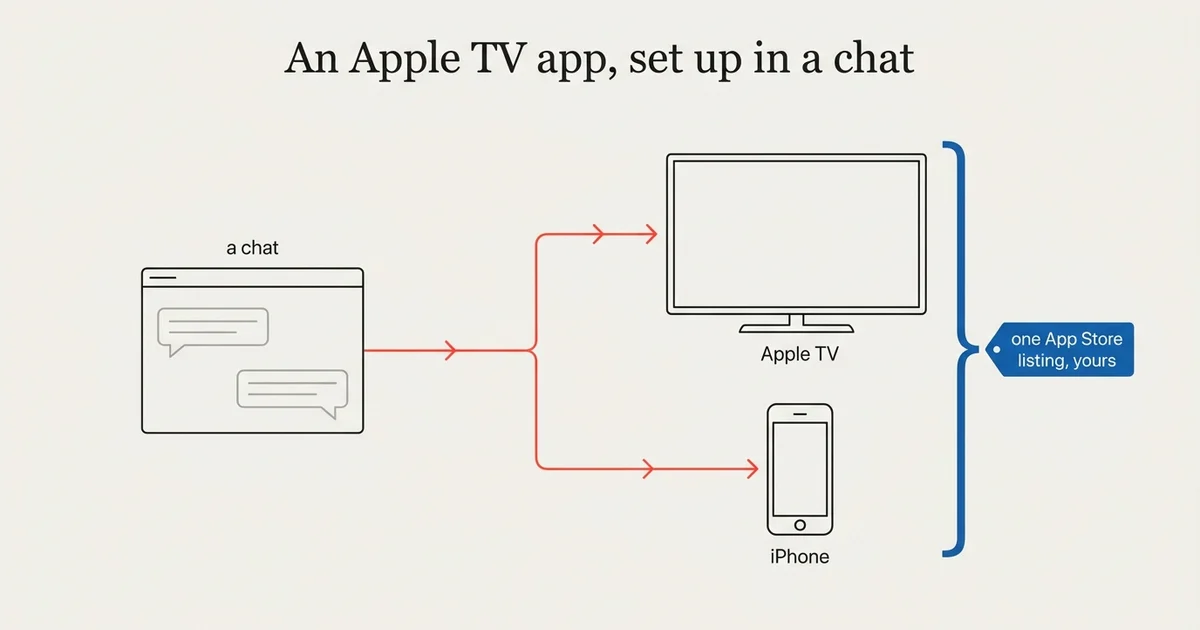
An Apple TV app needs the most preparation of the big TV platforms, and that is where Claude helps most. As of October 2026, you can connect Claude to your Tappla account and, in one conversation, brand the app from your website, set the name under its icon, connect your videos and get a list of what Apple still needs. Tappla builds and uploads the native tvOS app to your own App Store Connect, and you submit it.
This guide covers the Apple-specific parts. The whole path for every platform is in How to make your own TV app with Claude. We build those apps at Tappla, so read it with that in mind.
What makes Apple TV different
Apple checks every new developer account
The Apple Developer Program costs $99 a year, and Apple reviews each new account. An organization needs a D-U-N-S number first, a free company ID that Apple uses to verify organizations. Getting one takes a few days. Start that early: it is usually the slowest part of the whole launch.
The App Store listing is yours
We upload the finished app to your App Store Connect. You add the listing details and submit, so the app is published under your organization’s name.
iPhone comes with it
Every Tappla plan that includes Apple TV includes an iPhone app on the same App Store listing.
Step 1: Connect Claude
Open Tappla TV in Claude’s connector directory, click Connect, sign in to Tappla and click Allow. The steps are on our Claude page.
Step 2: Brand the app
Make my Apple TV app look like our website.
Claude reads your website and proposes the name, colors and logo, and saves them to your Tappla app once you approve them in the chat. Colors and the logo reach the app the next time it loads.
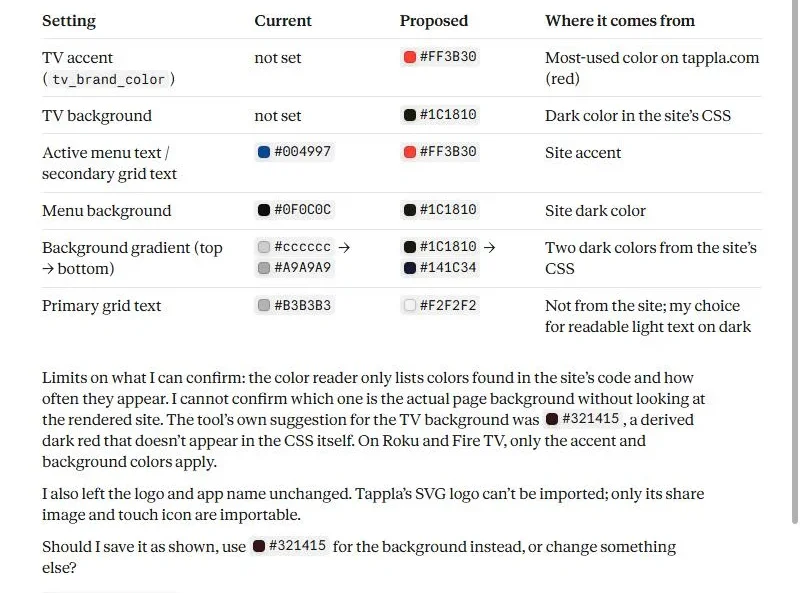
A real run on our test app, October 2026: Claude’s proposal, read from tappla.com. Nothing is saved yet.
The name under the icon
Call the app “Grace TV” on the Apple TV home screen.
The home-screen name is separate from the app name in the dashboard, and Claude can set it. It shows after the next build, because Apple bakes it into the app.
Step 3: Connect your videos
Our services are on BoxCast. How do I connect them?
Claude explains the steps for your host and links the right dashboard page. You save the source yourself; passwords and keys never go into the chat.
Apple TV plays HLS streams, which are links ending in .m3u8. If you add single videos by hand, use those rather than .mp4 links.
Step 4: Ask what Apple still needs
What do I still need before Apple TV can launch?
In our test, Claude named two things for Apple TV:
- An Apple Developer Program membership, with the hint that an organization needs a D-U-N-S number first, and that you then add your App Store Connect API key (you create it in your Apple developer account) on the Apple TV page.
- The store images: the layered app icon and the top shelf image (the wide banner Apple TV shows above your app when it is selected), added on the Apple TV page.
Step 5: We build, you submit
Request the build in the dashboard. We build, sign and upload the app to your App Store Connect; you add the listing details and submit for review. More: Apple TV app development.
What Claude does not do for Apple TV
- It does not create your Apple account or your App Store Connect key, and it never asks for the key in the chat.
- It does not submit the app for review.
- It does not change playlists, videos or the live stream.
Summing it up
Apple TV has the longest checklist of the TV platforms. Claude turns it into a conversation: your brand from your website, the home-screen name, your video source explained, and exactly what Apple still needs. The account, the key and the final submit stay with you.
Frequently asked questions
Can Claude make an Apple TV app?
Claude sets up and checks your Tappla app. Tappla builds and uploads the native tvOS app to your App Store Connect, and you submit it.
How much does the Apple developer account cost?
$99 a year, billed by Apple. An organization needs a free D-U-N-S number first.
Can Claude change the name under my app icon?
Yes. Claude can set the Apple TV home-screen name. It shows after the next build.
Do I give Claude my App Store Connect key?
No. You add the key in the dashboard. It never goes into the chat.
Do I get an iPhone app too?
Yes, on every plan that includes Apple TV, on the same App Store listing.
Put your channel on the TV — in days.
Connect the video source you already run and ship native apps under your own accounts. From $49/month.