Church Streaming Platforms Compared: Resi vs BoxCast vs StreamSpot (2026)
A 2026 comparison of the main church streaming platforms (Resi, BoxCast, StreamSpot and more) on reliability, ease and cost, plus the step most guides skip: getting your service onto the TV.
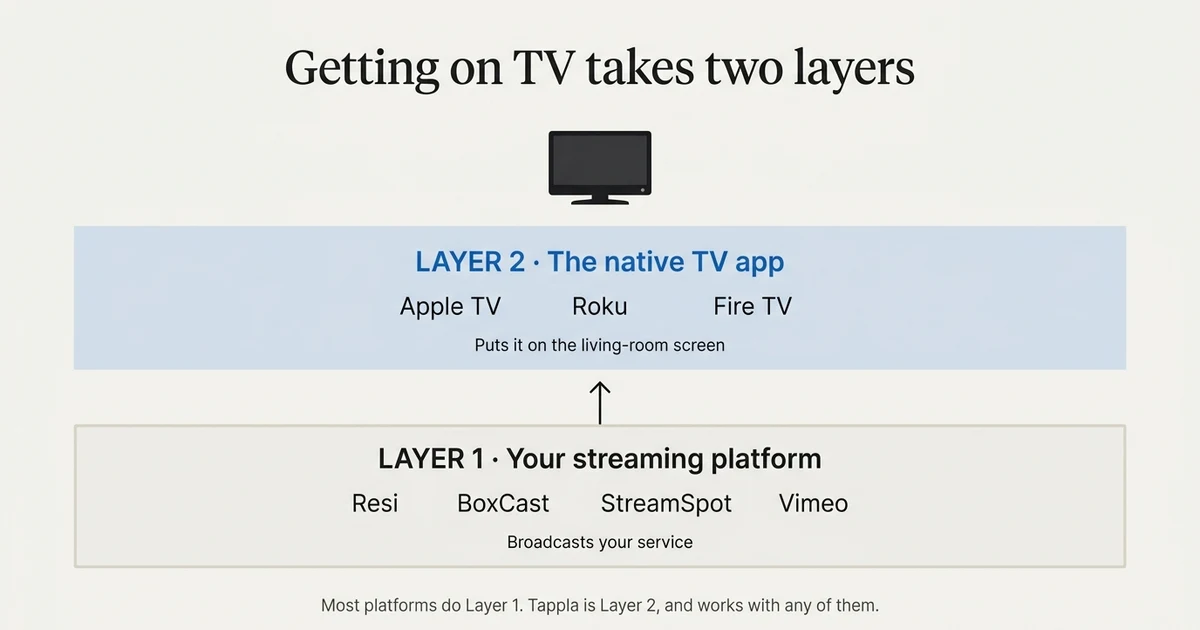
Church streaming platforms do two very different jobs, and most only do one of them. The first job is broadcasting your service reliably. The second is getting that service onto the living-room TV. In 2026, Resi, BoxCast and StreamSpot are the three names most churches compare for the first job, and almost none of them handle the second.
This guide compares the main church streaming platforms on the things that actually matter (reliability, ease, and cost), and then covers the step most comparisons leave out: putting your stream on Apple TV, Roku and Fire TV under your church’s own name.
First, separate the two jobs
Almost every confused church streaming decision comes from mixing up two separate layers.
Layer 1 is your streaming platform: the encoder and service that broadcasts Sunday’s service and stores your sermon archive. That’s what this comparison is about.
Layer 2 is the TV app: the native Apple TV, Roku and Fire TV app that shows Layer 1 on the living-room screen. That’s a different product, and we cover the whole picture in how to get your church on Apple TV, Roku and Fire TV.
Pick your streaming platform for Layer 1 on its own merits. The good news, which we’ll get to, is that the right Layer 2 tool works with all of them.
The main church streaming platforms in 2026
Here’s an honest read on the platforms churches compare most often. Pricing changes, so treat these as positioning rather than a price sheet, and check current plans before you commit.
Resi (formerly Living As One)
Resi built its reputation on resilient streaming: a store-and-forward approach that keeps your broadcast smooth even when the building’s internet is unstable. It leans toward hardware encoders and reliability-first churches that cannot afford a dropped Sunday. It’s typically the higher-end choice, and the one to look at if your last worry at 10:59 on Sunday is the upload holding.
BoxCast
BoxCast is the all-in-one, keep-it-simple option. Browser-based or hardware encoding, automatic restreaming to Facebook and YouTube, solid analytics, and a gentle learning curve. Churches that want one dashboard and minimal fuss tend to land here.
StreamSpot
StreamSpot positions itself as a managed, done-for-you church streaming service, with scheduling, multi-destination output, and support aimed at volunteer teams. A good fit when you want someone to have set it up correctly rather than assembling it yourself.
ChurchStreaming.tv
ChurchStreaming.tv is a budget-friendly, church-specific service. Fewer bells and whistles, but a straightforward way for a small congregation to get a reliable stream without a broadcaster’s budget.
Dacast
Dacast is a general-purpose live and on-demand streaming platform rather than a church-specific one. It’s flexible and broadcaster-oriented, which appeals to churches that want more control and don’t mind a slightly more technical setup.
Vimeo (for the sermon archive)
Vimeo is less a live-streaming platform and more the place many churches keep their sermon archive: clean hosting, playlists, and a reliable video library. Plenty of churches pair a live provider for Sunday with Vimeo for on-demand.
YouTube and Facebook Live
YouTube and Facebook Live are free and have enormous reach, and there’s no reason to abandon them. But they are reach, not ownership: your audience and your listing live on someone else’s platform, and you can’t turn them into a branded TV app you control. Use them alongside an owned stream, not instead of one.
Church streaming platforms compared
| Platform | Best for | Reliability focus | On-demand archive | Puts you on the TV? |
|---|---|---|---|---|
| Resi | Reliability-first churches | Very high (store-and-forward) | Yes | Not on its own |
| BoxCast | Simple all-in-one | High | Yes | Not on its own |
| StreamSpot | Done-for-you service | High | Yes | Not on its own |
| ChurchStreaming.tv | Tight budgets | Moderate | Yes | Not on its own |
| Dacast | Technical flexibility | High | Yes | Not on its own |
| Vimeo | The sermon archive | n/a (VOD) | Yes | Not on its own |
| YouTube / Facebook | Free reach | High | Yes | No (not owned) |
The pattern in the last column is the whole point of this article, and we’ll come back to it.
How to choose: match the platform to your team
There’s no single best church streaming platform. The right one is the one your volunteers can run every week without stress.
If reliability is your biggest worry
Go with Resi. If your internet is shaky or a dropped stream would be a real problem, its resilience is worth the premium.
If you want the simplest all-in-one
Go with BoxCast. One dashboard, easy multistreaming, and a shallow learning curve for volunteer teams.
If you want a done-for-you service
Go with StreamSpot. It’s built for churches that would rather hand off setup and support.
If budget is tight
Look at ChurchStreaming.tv for live, and Vimeo for the archive. You can run a reliable stream and a clean sermon library without a broadcaster’s budget.
The step most comparisons skip: getting on the TV
Here’s what almost every “best church streaming platform” list leaves out. Once you’ve chosen a platform and your service streams beautifully, your members still can’t open your church as an app on their Apple TV, Roku or Fire TV. They’re stuck casting a browser link, which is exactly the friction older members struggle with most.
Why your streaming platform usually can’t do this
Streaming platforms are Layer 1. Their job is to broadcast and host, not to publish a native app under your name to the App Store, the Roku Channel Store, and Fire TV. That’s Layer 2, and it’s a separate product. This is why churches with a great stream still don’t have a TV app.
How Tappla puts any of them on Apple TV, Roku and Fire TV
Tappla is the Layer 2 tool. It reads the stream you already run, whether that’s Resi, BoxCast, StreamSpot, Dacast, or a Vimeo archive, and turns it into native Apple TV, Roku and Fire TV apps published under your church’s own accounts. You keep your streaming platform. You just add the app layer on top.
Tappla connects to owned sources: an HLS live URL from your provider, a Vimeo library, or a JSON feed. It doesn’t turn a YouTube or Facebook page into an app, which is the honest reason to keep an owned stream alongside your social reach. The full walkthrough is in the church TV app guide, and the churches use-case page covers the church-specific setup.
What it costs
Your total is two line items: the streaming platform and the app layer.
Streaming platform pricing varies widely, from budget church services to higher-end resilient streaming, so compare current plans directly. On the app side, Tappla is $49/month for a single Roku or Fire TV app and $149/month for native Apple TV, Roku and Fire TV together; the managed video feed on its own is $24/month. Apple charges $99/year for a developer account, Roku is free, and the Amazon developer account for Fire TV is free too (we deliver the app via apps.tappla.com, ready to publish). Full details are on the pricing page.
Summing it up
Choose your church streaming platform for Layer 1 on its own merits: Resi for resilience, BoxCast for simplicity, StreamSpot for a done-for-you service, and Vimeo for the archive. Then add the layer most comparisons forget, a native TV app that puts whichever platform you chose onto Apple TV, Roku and Fire TV under your church’s name.
If you’re ready for that second layer, start with the church TV app guide or the churches use-case page.
Frequently asked questions
What’s the best streaming platform for churches?
There’s no single best. Resi is known for resilience, BoxCast for simplicity, StreamSpot for a done-for-you managed service, and Vimeo for the sermon archive. Choose the one your volunteers can run reliably every week, then add a TV app layer on top with a tool like Tappla.
Is Tappla a church streaming platform?
No. Tappla is the app layer, not a streaming platform. It doesn’t replace Resi, BoxCast or StreamSpot. It reads the stream you already run and turns it into native Apple TV, Roku and Fire TV apps under your church’s name. If your goal is to broadcast, you still need a streaming platform.
Can I put my Resi, BoxCast or StreamSpot stream on Apple TV, Roku and Fire TV?
Yes. Tappla connects to the HLS live URL from providers like Resi, BoxCast and StreamSpot, and to a Vimeo archive, and generates native apps for all three TV platforms. See the supported video sources list.
Can I use YouTube or Facebook Live for my church TV app?
Not for an owned app. YouTube and Facebook are great for reach, but you don’t own the listing or audience, and they can’t be turned into a branded TV app. Keep an owned stream (an HLS URL or a Vimeo archive) as the source for your app, and use social platforms alongside it.
Do I need to switch streaming platforms to get on the TV?
No. The TV app is a separate layer that sits on top of whatever streaming platform you already use. You keep your current setup and add the app.
How much does church streaming plus a TV app cost?
It’s two line items. Streaming platform pricing ranges from budget church services to higher-end resilient streaming. On the app side, Tappla is $49/month for a single Roku or Fire TV app and $149/month for all three native platforms, with the managed feed alone at $24/month. See the pricing page for the app-layer details.
Put your channel on the TV — in days.
Connect the video source you already run and ship native apps under your own accounts. From $49/month.